How to Configure Basic Apache Reverse Proxy

What is Reverse Proxy in Apache?
To understand reverse proxy we need to think of security in apache. There is no webserver that can be called as a completely secure webserver. And if you have a large website which is very popular and get a lot of requests from the internet, then security is always a headache and concern for the system administrator.
Its the policy of every system administrator to expose as minimum as possible to the Internet. Running all the applications that are completely different from each other in a website in one platform (one server), which is also the main webserver serving requests on the internet is not a good idea. Also increasing performance and loadbalencing the applications available on a website is also important.
The idea is depicted in the below picture.
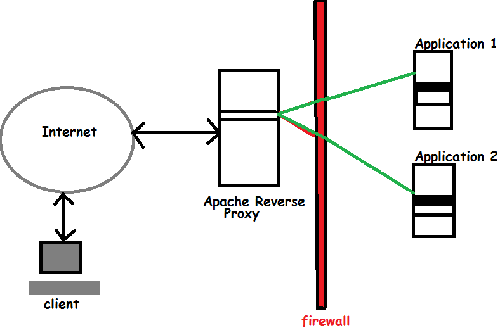
from the above figure we can see that the application servers are behind the firewall and are not accessible from the internet directly. Points to note about the application servers behind the firewall is as below.
- The application servers are not publicly accessible
- They do not have public IP address
- Their DNS entry if present is only for internal DNS servers
- the client is not even aware of their presence
- to the client the server present is only the Proxy Server.
Configuring Apache Reverse Proxy
The current HTTP/1.1 is supported in apache version 2 onwards, and also provides good caching and load balancing capabilities.
Modules Required for Reverse Proxy to Work:
- mod_proxy.so
- mod_proxy_http.so
mod_proxy is the module that deals with proxying in apache. And mod_proxy_http handles connections with both http and https. both the modules must be enabled in the config file as shown below.

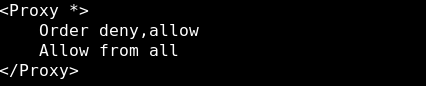
An important thing to note is that, you should never enable public proxy by doing "ProxyRequests On" in the config file
the main argument thats required in the httpd.conf file to enable proxying is the below one
Now lets setup the proxy rules for our reverse proxy in apache. Now lets imagine we have a domain called www.example.com and there are urls called www.example.com/firsturl and www.example.com/secondurl and /firsturl and /secondurl are different applications(which are fetched from application1 and application 2 servers as shown in the above explanation figure.)
We want the public to requst www.example.com from internet but, URL's /firsturl and /secondurl must be fetched by the proxy server from internal private network hosts(application1 and application2), with private network address.
We can easily do this by simply writing the below two rules in our httpd.conf file.
ProxyPass /firsturl/ http://192.168.0.1/
ProxyPassReverse /firsturl/ http://192.168.0.1/
ProxyPass /secondurl/ http://192.168.0.2/
ProxyPassReverse /secondurl/ http://192.168.0.2/
Now by adding the above four lines in the httpd.conf file we asked to fetch data for www.example.com/firsturl from http://192.168.0.1/ and www.example.com/secondurl from http://192.168.0.2/
Proxypass: This directive asks the apache server to fetch data for /firsturl from http://192.168.0.1/
ProxyPassReverse: This directive rewrites the original URL available to the Internet when the traffic is send back.
Now reload the httpd service and you are done with reverse proxying!
Archived comments
Imported from the original site, read-only.
Saurabh — 12/10/2013 - 19:36Thank you for the post. I have a different scenario where I need to run same application on the server but as two different instances. If you compare here, my "firsturl" and "secondurl" are the same say "firsturl". How do I proceed with reverse proxying in this case? Say if I deploy the application on two different ports how do I configure reverse proxy?
Sarath Pillai — 12/10/2013 - 21:52Hi Saurabh, Simply try it with the below configs.. ProxyPass /firsturl/ http://192.168.0.1:8000/ ProxyPassReverse /firsturl/ http://192.168.0.1:8000/ ProxyPass /secondurl/ http://192.168.0.2:8080/ ProxyPassReverse /secondurl/ http://192.168.0.2:8080/ It should work..Lemme know..
Saurabh — 12/11/2013 - 10:53Here is a complete description of the scenario, 1. I have an application say "MyApp" 2. I need to maintain two instances of the same application to run separately 3. I installed two different instances of tomcat and deployed the application on each but in different ports 4. First tomcat uses port 8443(ssl enabled) and second uses port 8444 5. I have configured reverse proxy so that all hits to the application server(tomcat) is made through web server(Apache) 6. Hence all hits are made to port 443(Apache) and requests to port 8443 need to be reverse proxied 7. Initially I had only one instance of my application running (in port 8443) and my reverse proxy configuration looked like this ProxyPass /MyApp https://localhost:8443/MyApp ProxyPassReverse /MyApp https://localhost:8443/MyApp 8. Then when the requirement came to maintain two instances of the application I deployed it on a second instance of tomcat running on port 8444 9. After that I configured reverse proxy as this ProxyPass /MyApp https://localhost:8443/MyApp ProxyPassReverse /MyApp https://localhost:8443/MyApp ProxyPass /MyApp https://localhost:8444/MyApp ProxyPassReverse /MyApp https://localhost:8444/MyApp 10. Now the problem here is requests to MyApp on each port are directed to both ports 8443 and 8444 11. So to differentiate between them I configured the app to run on different ports of Apache 12. First one running on port 443(by default) and second running on port 8087 13. I had my httpd configured as this Listen 443 Listen 8087
. . . . 14. I made the following configuration in reverse proxy ProxyPass https://myDomain/MyApp https://localhost:8443/MyApp ProxyPassReverse https://myDomain/MyApp https://localhost:8443/MyApp ProxyPass https://myDomain:8087/MyApp https://localhost:8444/MyApp ProxyPassReverse https://myDomain:8087/MyApp https://localhost:8444/MyApp 15. But that didn't work PS: First instance of tomcat is tomcat6 and second is tomcat7.
Badri — 01/29/2014 - 13:18Thank you, the solution works perfectly!
Bharath N — 08/08/2015 - 07:07Hi, I made revrse proxy like this proxypass /salary https://172.16.1.50/salary/login_details.jsp proxypassreverse /salary https://172.16.1.50/salary/login_details.jsp but it is not working via internet but works in internal network and in internal network it is opening using ip address but not the url. Suggest me please.
Umakant Mane — 01/11/2017 - 10:21really awesome explaination